会话
Hermes Agent 会自动把每一次对话保存为会话。会话支持恢复对话、跨会话搜索,以及完整的历史管理。
会话如何工作
每一次对话,无论来自 CLI、Telegram、Discord、Slack、WhatsApp、Signal、Matrix 还是其他任何消息平台,都会作为一个包含完整消息历史的会话保存下来。会话会同时记录在两套互补系统中:
- SQLite 数据库(
~/.hermes/state.db)- 保存结构化会话元数据,并支持 FTS5 全文搜索 - JSONL transcripts(
~/.hermes/sessions/)- 保存原始对话转录,包括工具调用(网关)
SQLite 数据库存储的内容包括:
- 会话 ID、来源平台、用户 ID
- 会话标题(唯一、可读的名称)
- 模型名称与配置
- 系统提示快照
- 完整消息历史(角色、内容、工具调用、工具结果)
- token 统计(输入 / 输出)
- 时间戳(
started_at、ended_at) - 父会话 ID(用于压缩触发时拆分出后续会话)
Session Sources
每个会话都会带有来源平台标签:
| Source | Description |
|---|---|
cli | 交互式 CLI(hermes 或 hermes chat) |
telegram | Telegram |
discord | Discord 服务器 / 私信 |
slack | Slack 工作区 |
whatsapp | |
signal | Signal |
matrix | Matrix 房间与私信 |
mattermost | Mattermost 频道 |
email | 电子邮件(IMAP / SMTP) |
sms | 通过 Twilio 发送的短信 |
dingtalk | 钉钉 |
feishu | 飞书 / Lark |
wecom | WeCom(企业微信) |
weixin | 微信(个人微信) |
bluebubbles | 通过 BlueBubbles macOS server 接入的 Apple iMessage |
qqbot | 通过 Official API v2 接入的 QQ Bot(腾讯 QQ) |
homeassistant | Home Assistant 对话 |
webhook | 传入 webhook |
api-server | API server 请求 |
acp | ACP 编辑器集成 |
cron | 定时 cron 作业 |
batch | 批处理运行 |
CLI 会话恢复
你可以在 CLI 中使用 --continue 或 --resume 恢复之前的对话:
Continue Last Session
# Resume the most recent CLI session
hermes --continue
hermes -c

# Or with the chat subcommand
hermes chat --continue
hermes chat -c
这会从 SQLite 数据库中查找最近一次 cli 会话,并加载它的完整对话历史。
Resume by Name
如果你给会话设置了标题(见下文 Session Naming),就可以按名称恢复:
# Resume a named session
hermes -c "my project"

# If there are lineage variants (my project, my project #2, my project #3),
# this automatically resumes the most recent one
hermes -c "my project"   # → resumes "my project #3"
Resume Specific Session
# Resume a specific session by ID
hermes --resume 20250305_091523_a1b2c3d4
hermes -r 20250305_091523_a1b2c3d4

# Resume by title
hermes --resume "refactoring auth"

# Or with the chat subcommand
hermes chat --resume 20250305_091523_a1b2c3d4
退出 CLI 会话时会显示会话 ID,也可以通过 hermes sessions list 找到它们。
Conversation Recap on Resume
恢复会话时,Hermes 会在输入提示前用一个样式化面板展示上次对话的简要回顾:
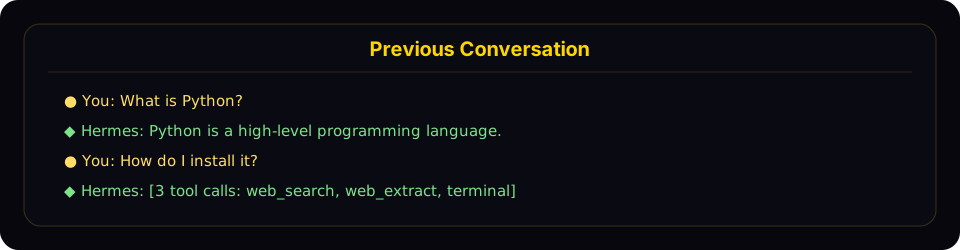
恢复模式会显示一个紧凑的回顾面板,列出最近的用户与 assistant 轮次,然后再回到实时输入提示。
这个回顾会:
- 显示用户消息(金色
●)与assistant 回复(绿色◆) - 截断长消息(用户 300 字符;assistant 200 字符 / 3 行)
- 将工具调用折叠成数量与工具名(例如
[3 tool calls: terminal, web_search]) - 隐藏系统消息、工具结果和内部推理
- 最多显示最近 10 轮交互,并在前面用
... N earlier messages ...标示更早的内容 - 使用弱化样式,以便与当前活动对话区分开
如果你想关闭这个回顾,恢复成最简的一行模式,可在 ~/.hermes/config.yaml 中设置:
display:
  resume_display: minimal   # default: full
会话 ID 的格式为 YYYYMMDD_HHMMSS_<8-char-hex>,例如 20250305_091523_a1b2c3d4。你可以通过 ID 或标题来恢复,-c 和 -r 都支持。
Session Naming
给会话设置可读标题,可以让你更容易查找和恢复它们。
Auto-Generated Titles
Hermes 会在第一次往返之后,自动为每个会话生成一个简短的描述性标题(3 到 7 个词)。这个过程在后台线程中用一个快速辅助模型完成,因此不会增加交互延迟。你在 hermes sessions list 或 hermes sessions browse 中浏览会话时,就能看到这些自动生成的标题。
自动命名每个会话只会触发一次;如果你已经手动设置了标题,则会跳过自动命名。
Setting a Title Manually
你可以在任意聊天会话中(CLI 或网关)使用 /title 斜杠命令:
/title my research project
标题会立即应用。如果会话尚未写入数据库(例如你在发出第一条消息之前就先运行了 /title),这个标题会先排队,等会话真正开始后再应用。
你也可以通过命令行重命名已有会话:
hermes sessions rename 20250305_091523_a1b2c3d4 "refactoring auth module"
Title Rules
- 唯一 - 两个会话不能拥有相同标题
- 最多 100 个字符 - 保持列表输出整洁
- 自动净化 - 控制字符、零宽字符和 RTL override 会被自动移除
- 普通 Unicode 完全可用 - emoji、CJK、重音字符都支持
Auto-Lineage on Compression
当某个会话的上下文被压缩时(无论是手动执行 /compress,还是自动压缩),Hermes 会创建一个新的续接会话。如果原会话有标题,新会话会自动获得带编号的标题:
"my project" → "my project #2" → "my project #3"
如果你按名称恢复(hermes -c "my project"),Hermes 会自动选择这个 lineage 中最新的那个会话。
/title in Messaging Platforms
/title 命令同样适用于所有网关平台(Telegram、Discord、Slack、WhatsApp):
/title My Research- 设置当前会话标题/title- 显示当前标题
Session Management Commands
Hermes 通过 hermes sessions 提供一整套会话管理命令:
List Sessions
# List recent sessions (default: last 20)
hermes sessions list

# Filter by platform
hermes sessions list --source telegram

# Show more sessions
hermes sessions list --limit 50
如果会话带有标题,输出会显示标题、预览和相对时间戳:
Title                  Preview                                  Last Active   ID
────────────────────────────────────────────────────────────────────────────────────────────────
refactoring auth       Help me refactor the auth module please   2h ago        20250305_091523_a
my project #3          Can you check the test failures?          yesterday     20250304_143022_e
—                      What's the weather in Las Vegas?          3d ago        20250303_101500_f
如果尚无会话标题,则会使用更简单的格式:
Preview                                            Last Active   Src    ID
──────────────────────────────────────────────────────────────────────────────────────
Help me refactor the auth module please             2h ago        cli    20250305_091523_a
What's the weather in Las Vegas?                    3d ago        tele   20250303_101500_f
Export Sessions
# Export all sessions to a JSONL file
hermes sessions export backup.jsonl

# Export sessions from a specific platform
hermes sessions export telegram-history.jsonl --source telegram

# Export a single session
hermes sessions export session.jsonl --session-id 20250305_091523_a1b2c3d4
导出的文件每一行都是一个 JSON 对象,包含完整的会话元数据以及所有消息。
Delete a Session
# Delete a specific session (with confirmation)
hermes sessions delete 20250305_091523_a1b2c3d4

# Delete without confirmation
hermes sessions delete 20250305_091523_a1b2c3d4 --yes
Rename a Session
# Set or change a session's title
hermes sessions rename 20250305_091523_a1b2c3d4 "debugging auth flow"

# Multi-word titles don't need quotes in the CLI
hermes sessions rename 20250305_091523_a1b2c3d4 debugging auth flow
如果标题已被其他会话占用,命令会报错。
Prune Old Sessions
# Delete ended sessions older than 90 days (default)
hermes sessions prune

# Custom age threshold
hermes sessions prune --older-than 30

# Only prune sessions from a specific platform
hermes sessions prune --source telegram --older-than 60

# Skip confirmation
hermes sessions prune --older-than 30 --yes
prune 只会删除已结束的会话,也就是那些已显式结束或自动重置的会话。活动中的会话永远不会被 prune。
Session Statistics
hermes sessions stats
输出示例:
Total sessions: 142
Total messages: 3847
  cli: 89 sessions
  telegram: 38 sessions
  discord: 15 sessions
Database size: 12.4 MB
如果你需要更深入的分析,例如 token 使用量、成本估算、工具拆分和活跃模式,可使用 hermes insights。
Session Search Tool
agent 内置了一个 session_search 工具,它会利用 SQLite 的 FTS5 引擎,对过去的所有对话执行全文搜索。
How It Works
- FTS5 搜索匹配消息,并按相关性排序
- 按会话分组结果,选取前 N 个唯一会话(默认 3 个)
- 加载每个会话的对话内容,并截取匹配点周围约 100K 字符
- 发送给快速摘要模型,生成聚焦摘要
- 返回按会话划分的摘要结果,附带元数据与上下文
FTS5 Query Syntax
搜索支持标准 FTS5 查询语法:
- 简单关键字:
docker deployment - 短语:
"exact phrase" - 布尔逻辑:
docker OR kubernetes、python NOT java - 前缀:
deploy*
When It's Used
系统提示会自动引导 agent 在适当时使用会话搜索:
"When the user references something from a past conversation or you suspect relevant prior context exists, use session_search to recall it before asking them to repeat themselves."
Per-Platform Session Tracking
Gateway Sessions
在消息平台中,会话会根据消息来源构造出的确定性 session key 进行索引:
| Chat Type | Default Key Format | Behavior |
|---|---|---|
| Telegram DM | agent:main:telegram:dm:<chat_id> | 每个私聊一个会话 |
| Discord DM | agent:main:discord:dm:<chat_id> | 每个私聊一个会话 |
| WhatsApp DM | agent:main:whatsapp:dm:<chat_id> | 每个私聊一个会话 |
| Group chat | agent:main:<platform>:group:<chat_id>:<user_id> | 如果平台能提供用户 ID,则群内按用户隔离 |
| Group thread/topic | agent:main:<platform>:group:<chat_id>:<thread_id> | 默认是线程参与者共享一个会话;若设置 thread_sessions_per_user: true 则按用户隔离 |
| Channel | agent:main:<platform>:channel:<chat_id>:<user_id> | 如果平台能提供用户 ID,则频道内按用户隔离 |
如果 Hermes 无法为共享聊天获取参与者标识,就会退回为该房间共用一个会话。
Shared vs Isolated Group Sessions
默认情况下,Hermes 在 config.yaml 中使用 group_sessions_per_user: true。这意味着:
- Alice 和 Bob 可以在同一个 Discord 频道中和 Hermes 对话,但不会共享转录历史
- 一个用户的长时间、重工具任务不会污染另一个用户的上下文窗口
- 中断处理也是按用户隔离的,因为 running-agent key 与隔离后的 session key 一一对应
如果你想让一个群组共享同一个“房间大脑”,可以设置:
group_sessions_per_user: false
这样 group / channel 会退回为每个房间共享一个会话,能够保留共享上下文,但同时也会共享 token 成本、中断状态和上下文增长。
Session Reset Policies
网关会话会依据可配置策略自动重置:
- idle - 空闲 N 分钟后重置
- daily - 每天固定时刻重置
- both - 先满足哪个条件就按哪个重置
- none - 从不自动重置
在会话自动重置之前,agent 会先得到一个机会,把这段对话中重要的记忆或技能保存下来。
如果某个会话中有活跃的后台进程,则无论策略如何都不会自动重置。
Storage Locations
| What | Path | Description |
|---|---|---|
| SQLite database | ~/.hermes/state.db | 所有会话元数据和消息,带 FTS5 搜索 |
| Gateway transcripts | ~/.hermes/sessions/ | 每个会话的 JSONL transcript,以及 sessions.json 索引 |
| Gateway index | ~/.hermes/sessions/sessions.json | 将 session key 映射到活动 session ID |
SQLite 数据库采用 WAL 模式,适合网关的多平台架构,因为它能很好地支持多个 reader 和单个 writer。
Database Schema
state.db 中的关键表包括:
- sessions - 会话元数据(id、source、user_id、model、title、timestamps、token counts)。标题带唯一索引(允许 NULL,只有非 NULL 必须唯一)。
- messages - 完整消息历史(role、content、tool_calls、tool_name、token_count)
- messages_fts - 使用 FTS5 的虚拟表,用于对消息内容做全文搜索
Session Expiry and Cleanup
Automatic Cleanup
- 网关会话会按配置的重置策略自动重置
- 在重置之前,agent 会把即将过期会话中的记忆和技能保存下来
- 可选启用自动 prune:当
sessions.auto_prune为true时,CLI / 网关 启动时会清理那些早于sessions.retention_days(默认 90 天)的已结束会话 - 如果本次 prune 实际删除了记录,则会对
state.db执行VACUUM以回收磁盘空间(SQLite 普通 DELETE 不会缩小文件) - prune 最多每
sessions.min_interval_hours执行一次(默认 24 小时);最后执行时间记录在state.db中,因此同一HERMES_HOME下的所有 Hermes 进程都会共享这份状态
默认是关闭的,因为会话历史对于 session_search 回忆过去对话非常有价值,而静默删除这些内容可能会让用户意外。你可以在 ~/.hermes/config.yaml 中启用它:
sessions:
  auto_prune: true          # opt in — default is false
  retention_days: 90        # keep ended sessions this many days
  vacuum_after_prune: true  # reclaim disk space after a pruning sweep
  min_interval_hours: 24    # don't re-run the sweep more often than this
无论过了多久,活动中的会话都不会被自动 prune。
Manual Cleanup
# Prune sessions older than 90 days
hermes sessions prune

# Delete a specific session
hermes sessions delete <session_id>

# Export before pruning (backup)
hermes sessions export backup.jsonl
hermes sessions prune --older-than 30 --yes
数据库增长通常很慢,几百个会话一般也只有 10 到 15 MB,而会话历史还能为 session_search 提供跨对话回忆能力,因此默认关闭自动 prune。如果你在运行重负载的网关或 cron 任务,且 state.db 已明显影响性能(一个观察到的失败模式是大约 1000 个会话导致 state.db 增长到 384 MB,从而拖慢 FTS5 插入和 /resume 列表),再考虑启用它。对于一次性清理,也可以直接运行 hermes sessions prune,无需打开自动清扫。